

UPN different from email address - more security or more confusion?
Your username is 50% of everything needed to break into your account. Whether hiding it is worth the trouble is a different question.

Most of the services we use on the Internet don’t let you choose - your username is your email address. Period.
But some, like Microsoft 365, let you choose a User Principal Name (UPN) that can be equal or different from your public email address.
Choosing a different one gives you more security. It also gives you more confusion. Both are true at the same time, and that is the whole problem.
Let’s break this down, because the official recommendation is not the one you would expect from a security article.
What a UPN actually is
The UPN is the username of the account. In Microsoft 365 and Entra ID, it is what you type in the sign-in box.
It is formatted like an email address - user@contoso.com - and that is exactly why people mix up the two things. It looks like an email address, but it is not one. The UPN is a login identity; your email address is a communication identity, living in a different attribute.
By default, Microsoft 365 generates the email address from the UPN, so the two end up identical and nobody ever thinks about it again. But you can choose. Your UPN can be something totally different, unguessable, not related - and it just can be memorable anyway.
Is it important to hide our username?
If we exclude other factors of authentication, usernames and passwords are everything you need to know to log into an account.
When you know the username of an account, you know 50% of the information needed to log in to that account; when you know the password, you know the other half.
It’s true that we are moving towards a passwordless1 world, which not only simplifies login but is also more secure, but it is still faraway from reality in most of the systems we use daily.
What happens when the UPN is the email address
You publish your username. In your signature, on your website, in every message you have ever sent.
So anyone that wants to attack you, anyone that wants to compromise your accounts, already holds half of the binomial username-password. They will be trying to guess the password that represents the other 50%.
And they don’t even need to be interested in you. Password spraying works the other way around: take a big list of harvested addresses, try a handful of very common passwords against all of them, and see which doors open. Your account gets hit just because your username was easy to collect.
What if no one knows your username?
Normally the password is the most difficult part to guess. But what if no one knows your username?
Your account is more protected that way. People will be trying to log in with your email address and every try goes to a wall, because that account simply doesn’t exist. The account that exists is the one with your UPN.
It gives you a clear separation between the login identity and the external communication identity. And it takes you off the spray lists, where most of the volume is.
Let’s be honest: this is obscurity
And obscurity leaks. There are several ways your UPN comes out:
Sign-in endpoints don’t always behave identically for accounts that exist and accounts that don’t, and there are tools that automate that check.
A keylogger on your device is saving your usernames, passwords and whatever you type. If you have one running, the attacker knows your UPN.
Someone in your company writes it in an email to a supplier, and it’s out.
So no, this doesn’t make you safe. Don’t rely on this alone and think you are protected, because that will not happen. It is one more layer - strong or weak, it is one more - and it only works on top of the real ones.
The confusion is real
Now the part I have to concede.
Imagine your company applies this and you are part of a cross-tenant synchronization2, or of a larger group, or your customers and providers give you access to their tenant.
People, by default, will give you access by your public email address, and it won’t work. It’s hard for them to understand that they need to use your UPN instead. Those are different things, and for non-technical people that distinction is hard to hold on to.
It works with SSO. But you will need to prepare yourself to explain it, to some people, at some point in time. Your helpdesk too. Every single time.
What Microsoft says, and what it doesn’t
The official recommendation from Microsoft is for the UPN to match the email address.
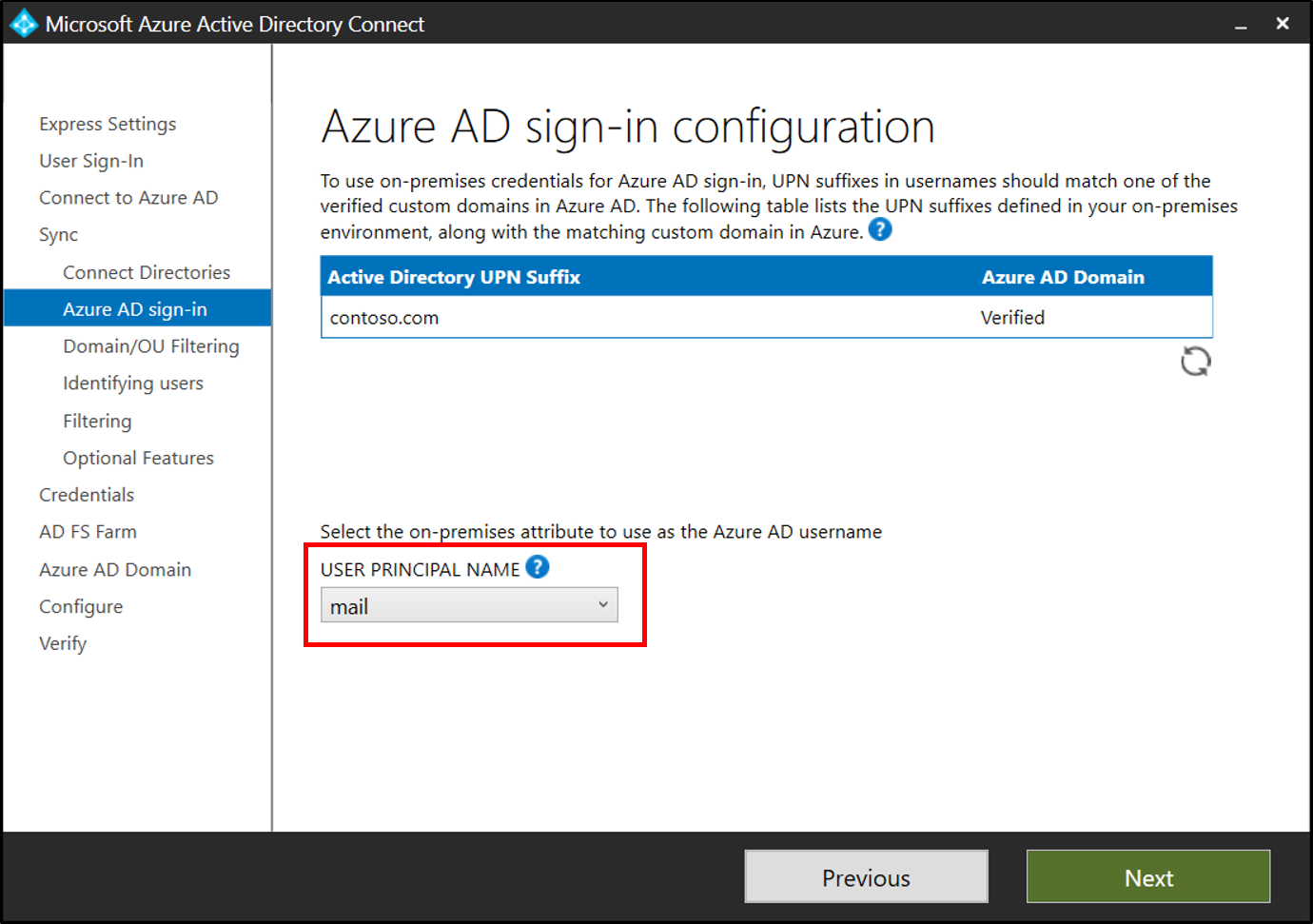
But read the reason. Microsoft says that when the two are set to different values there can be confusion for administrators and end users, and that “it’s best to align these attributes to reduce confusion.”
Confusion. Not weaker security. Nobody claims a hidden username is worse for security - the argument against it is operational, and it is a good one3. That distinction is the whole article: this is usability versus security, not right versus wrong.
Companies rely on other protections
Many companies don’t do this, including major companies, and that’s okay.
They prefer other measures like Multi-Factor Authentication, Conditional Access, sign-in risk policies. If you have a limited budget of effort - and everyone does - those pay far more per hour than renaming your users. A different UPN buys you very little on an account that already requires a passkey and a compliant device.
Here is my article about Multi-Factor Authentication, in case you want to know more about it:

Where I would actually do it
Admin accounts.
This is where the trade-off flips. Admin accounts are few, they belong to technical people, and they don’t correspond with the outside world — so most of the confusion I described above disappears. Nobody invites your break-glass account to a Teams meeting. And these are the most attacked accounts in the tenant.
The cost collapses, the benefit stays.
Microsoft already accepts this kind of trade-off, by the way. It tells you to create dedicated admin accounts, separate from the one the person uses every day, and to keep break-glass accounts that belong to nobody. That is friction accepted on purpose. Not the same thing I’m proposing — but the same reasoning.
Same for service accounts.
So, my recommendation
For regular users in a normal company: keep the UPN equal to the email address and spend the effort on MFA and Conditional Access instead. The confusion is a daily cost paid by everyone, and the security you get back is thin.
For admin, service and break-glass accounts: make them different. Always.
And if you run a small technical team with high security requirements and nobody who will file a ticket about it, do it everywhere. It is more secure. It is just not free.
So I think it is both more secure and more confusing. Each one, or each company, should choose its way. What I didn’t want was for you to not know the option exists.
See you next week.
Best,
Nelson
Passwordless is an authentication method that allows users to log in without entering a traditional password, typically using alternatives like magic links, biometrics (fingerprint/face ID), hardware keys (YubiKey), or passkeys.
Cross-tenant synchronization is a Microsoft Entra ID (formerly Azure AD) feature that automatically syncs user accounts, groups, and attributes from one tenant to another (for example, in mergers, acquisitions, or multi-company organizations).
One practical note if you decide to try it: changing the UPN on accounts that already exist is not free, because it touches cached credentials, OneDrive and Teams. This decision is much cheaper on day one than on day four hundred.