

You Already Have SD-WAN. SASE Is the Half You're Missing
Part 1 of 3: what SASE actually adds, and who Gartner calls a Leader

TL;DR: SASE bundles secure remote access, cloud security, and SD-WAN into one architecture. It matters because your users, apps, and data stopped living inside your network years ago. Every vendor implements it differently, and the details you don’t ask about are the ones that bite you later.
Late in 2021, Gartner coined an architecture called Secure Access Service Edge (SASE) that solves this properly, along with a lot of other problems most of us were patching around individually.
Every major manufacturer then built their own version of it.
If you’re evaluating SASE today, as of Gartner’s most recent Magic Quadrant for SASE Platforms (July 2026), the Leaders quadrant is Cato Networks, Netskope, Palo Alto Networks and Zscaler.
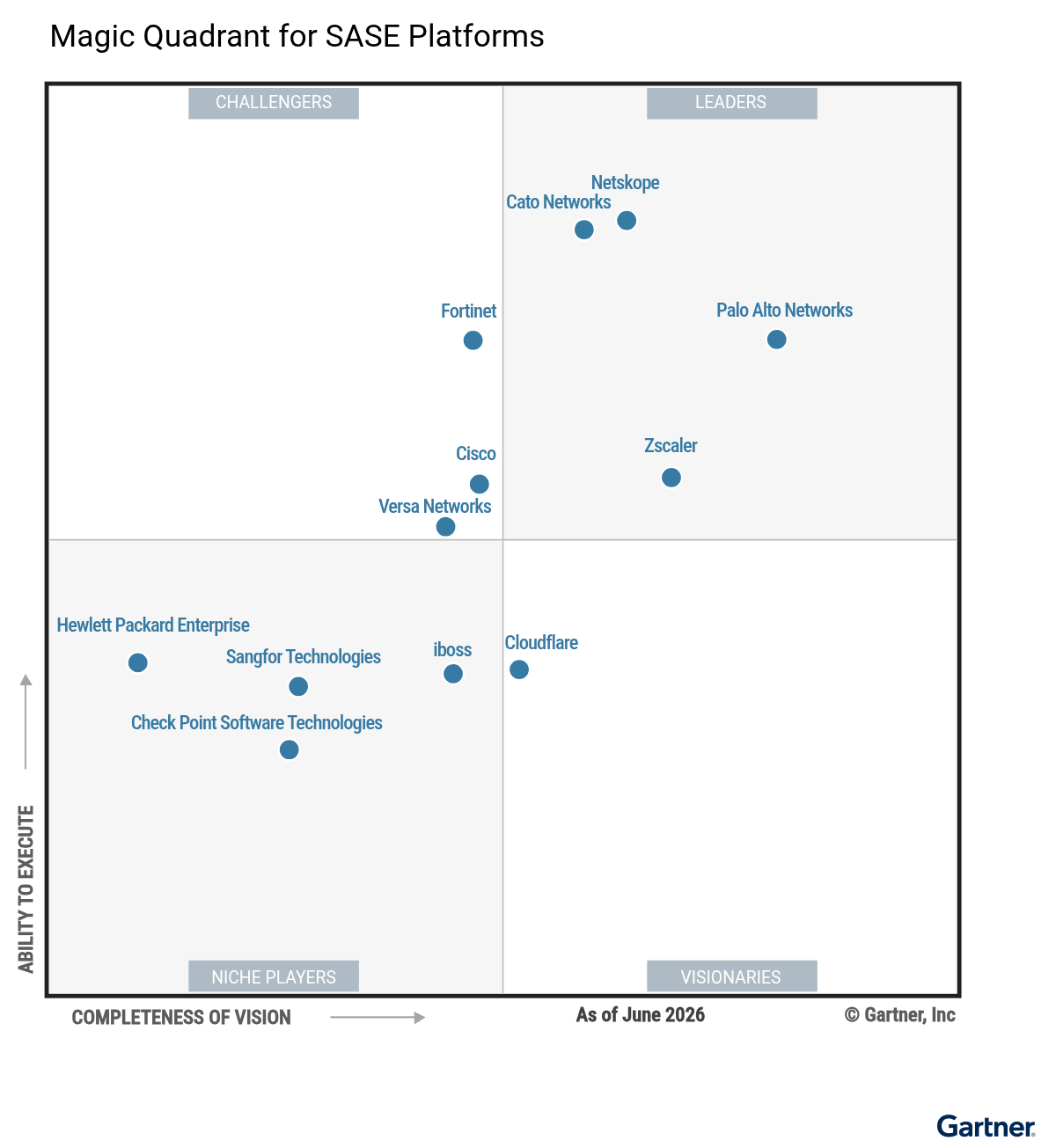
The architecture is similar across vendors, but the products are not.
This series isn’t a vendor comparison, but a field guide to what to pay attention to before you sign anything, in three parts:
What SASE is and why it matters (this one);
What to ask every vendor before you sign (part 2); and
The vocabulary worth understanding (part 3).
SASE = SD-WAN + SSE
SASE is the marriage of two things: SD-WAN, which intelligently routes your traffic across multiple WAN links, and SSE (Security Service Edge), which handles the security side - delivered as a cloud service from points of presence (PoPs) placed as close as possible to your users.
Why this matters in practice
Many companies start with SSE alone, because they already have working network infrastructure, and add SD-WAN later;
Others go straight for full SASE, especially when they’re modernizing branches or thin edge sites;
SSE solves the classic problem of “users are everywhere and so are the application” by applying the same security policy no matter where the person is sitting.
What SSE includes
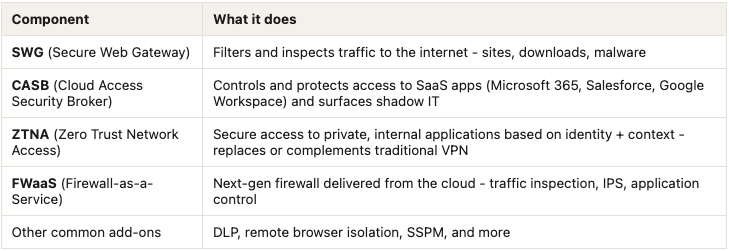
(We’ll go deeper on ZTNA, CASB and the rest in part 3.)
Agent and agentless
You can connect users through a software agent installed on company devices, or go agentless.
Agentless typically routes traffic through a browser extension or an explicit proxy configuration, which is also how you cover OT devices that can’t run an agent but can be pointed at a proxy.
Either way, the traffic still ends up at the vendor’s PoP for inspection. Agentless just changes how it gets routed there, not whether it does.
Protecting users remotely
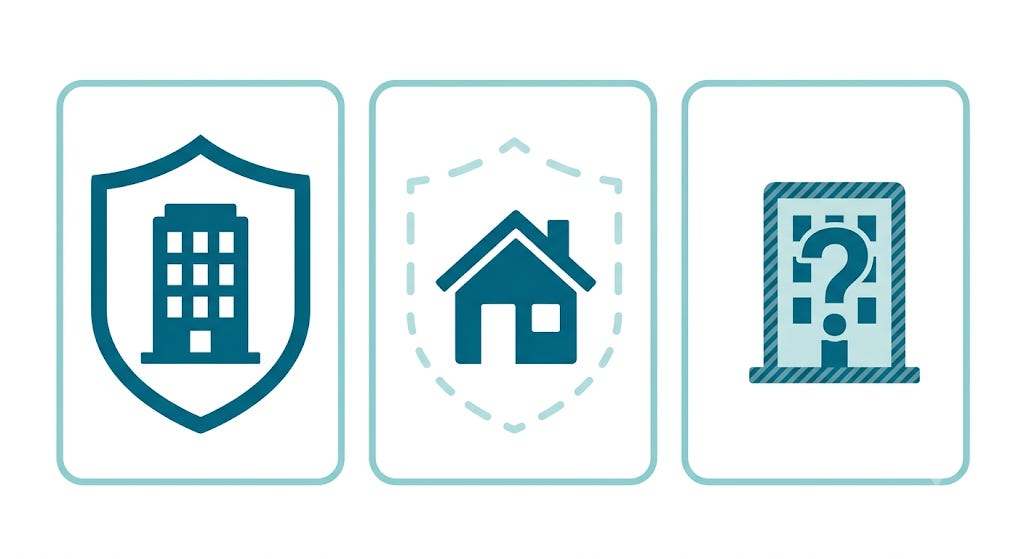
Your company probably has hybrid users, and they live in two very different realities depending on where they happen to be.
At headquarters or any company site, they’re fully protected by your network. They’re behind firewalls, and generating logs that are sent to your SOC.
At home, they have something close to zero network protection: your ISP router isn’t securing anything on your behalf.
When they connect at a customer’s or supplier’s office, you have no idea what they’re walking into. It might be protected, it might not, and even if it is, it’s not protected to your standards.
SASE collapses that gap. The same policy applies regardless of which of those three realities the user is currently in.
Protecting your C-suite
Some vendors sell thin edge devices you can place in executives’ homes as a specific use case.
But, if the exec already has the agent installed on their laptop, what does a physical box in the house actually add?
The laptop’s agent protects the laptop. A thin edge devices protects the network (every other device on that home connection): the smart TV, the kid’s console, the partner’s work laptop from a different company, the IoT thermostat nobody remembers connecting.
For a C-level target with a home network you don’t control and can’t fully inventory, that’s a meaningfully different security boundary.
Entry point for contractors
This is where agentless access earns its keep.
A contractor’s laptop is a device you’ll never manage, will never join to your directory, and probably shouldn’t get a VPN client installed on.
ZTNA delivered agentlessly - through a browser portal or reverse proxy - gives that contractor access to exactly the application they need, scoped by identity and context, without you touching their device at all.
It’s the difference between handing someone a key to the building and handling them a key to one room.
Accessing what they want and circumventing company rules
Take sites your block at the firewall level.
When users work remotely, their traffic never reaches that firewall, so the block that works in the office simply doesn’t exist outside it.
And even inside your offices, a user who connects to a personal hotspot routes around the same rule - unless you’re also enforcing it at the device level through your antivirus or endpoint policy.
With SASE, because you control the traffic no matter where the user is or what network they’re on, the experience, and the policy, stays identical everywhere.
It’s not only for remote users
This same architecture applies to your on-site users too, so that no external service ever sees their real IP address - only the IP of the SASE provider’s PoP.
That’s worth doing even for people sitting at HQ, not just the remote crowd.
So, if you have to start somewhere, start with remote users. But don’t stop there.
Coming in part 2
SASE still leaves a gap you local firewall has to cover, vendors differ wildly on how many egress IPs they give you (and whether they’re shared with other customers - which somehow breaks Conditional Access), and there’s a checklist of questions worth asking before you sign anything. That’s next.
Thanks for reading!
See you next week,
Nelson